Pinwheel DME System Overview
SwiftData’s Pinwheel DME (Data Management Engine) is a custom-tailored data management solution for higher education and enterprise organizations of any size. Pinwheel DME eliminates the need for manual updates or “one size fits all” data importers to manage your disparate campus auxiliary systems. Using a DME like Pinwheel reduces the workload of your system admins and eliminates costly human errors. Plus your institution can better leverage the investments made in your third-party systems.
Pinwheel DME also serves as a business intelligence hub for campus auxiliary activity data. Any third-party system Pinwheel DME connects to that provides the capability for capturing historical transaction data is securely stored within the DME database. We store all incoming data in a single, standardized history table making it easy for you to either report directly on this data, or channel it to another database or reporting system.
To further increase the value of incorporating disparate campus activity data we developed the SwiftPass Module, which provides unlimited use of the SwiftPass activity tracking application. SwiftPass can be used campus-wide anywhere you wish to record history of student activity.
By combining SwiftPass data with history from all other connected systems you will have a much broader picture of student engagement that can be used with other University engagement and retention initiatives.
At its core, Pinwheel DME consists of three major components:
- the Pinwheel DME database;
- the Pinwheel Client Program;
- the Vendor Plug-In.
Pinwheel DME Database
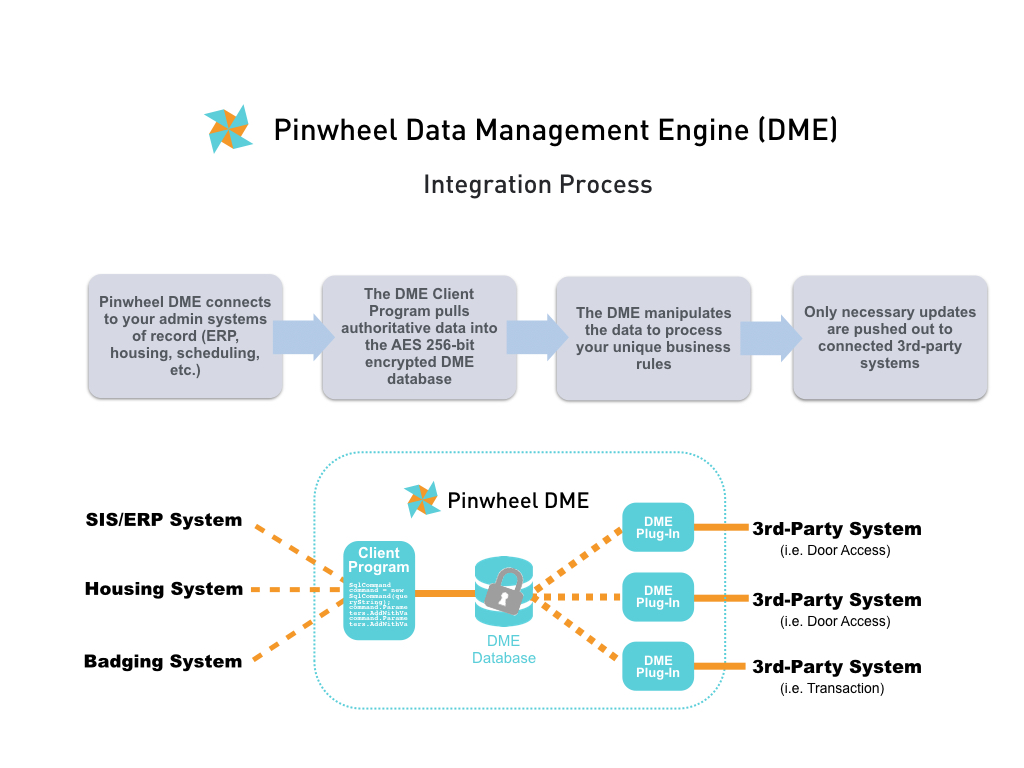
The DME database is a large data warehouse that stores all incoming data and updates the data on a continuous schedule. Pinwheel DME processes and manipulates the data based on your custom requirements. The DME then sends the manipulated data to the appropriate third-party systems in their respective required formats.
Most third-party system databases have a single purpose like transaction processing or door access. SwiftData built Pinwheel DME as a standalone database with many fields and flags to allow for multiple simultaneous third-party connections.
The DME database encrypts all non-numeric fields. No third-party systems connected to the DME can read or access your data.
You can host the DME database locally on a physical or virtual server. You can optionally let SwiftData host your database on our secure cloud server. Some third-party systems may require for SwiftData to host the DME database in our cloud. DME database server requirements are as follows:
- At least 1GB RAM
- At least 100GB storage
- Windows Server (2003 or better; client-supplied)
- Microsoft SQL Server (2005 or better; client-supplied)
No matter who hosts the DME database the client always retains complete ownership of their data.
Pinwheel Client Program
The Pinwheel Client Program (CP) resides on the client network and interfaces to all systems of record. The CP can accept a raw data feed from as many authoritative data sources as needed to meet your desired outcomes. The CP runs on a schedule sending updates from the systems of record to the DME database. The most common systems of record include the client’s SIS or ERP systems, badging systems and housing systems.
There is no limit to the number of systems of record the CP can connect to. Also, SwiftData includes all modifications to the CP due to updates or changes in the client’s systems of record at no charge.
Vendor Plug-In
A Vendor Plug-In (VPI) in Pinwheel DME is a program that pushes the processed data from the DME database to the third-party system in the correct format for that system.
There are two types of VPIs, our Certified Plug-In and standard Third-Party Plug-In. Both Plug-Ins are Windows-based programs that run on the third-party system.
A Certified Plug-In can have up to four areas of certification depending on the function of the vendor’s application: Demographic, Financial, Historical and Access Management. Using a vendor partner with a Plug-In that receives multiple certifications will generally allow for a single point of contact for troubleshooting and the ability for quicker and more flexible integration capabilities.
If your campus vendor is not currently a SwiftData Authorized Partner or hasn’t provided certain levels of database access they can still use our standard Third-Party Plug-In. The Third-Party Plug-In uses a vendor’s available API or other native methods for passing data to their system.
You can connect as many VPIs to the Pinwheel DME as you wish, even systems of the same type. For example, an institution might have an academic campus and an associated hospital but with different door access systems at those locations. The institution can use Pinwheel DME with two different VPIs to automate the management of the different access systems without extra work for their staff.
Any system database connecting to the Pinwheel DME requires its own VPI. SwiftData includes all modifications to a VPI due to updates or changes in a vendor’s system at no charge.
SwiftPass
SwiftPass is a lightweight activity tracking application that serves two purposes: record and store campus activity history in the Pinwheel DME, and provide privilege control at campus locations.
While Pinwheel DME can record history for any third-party system or activity reader (where the respective Plug-In supports this functionality) SwiftData developed SwiftPass as an inexpensive option to provide widespread data collection points.
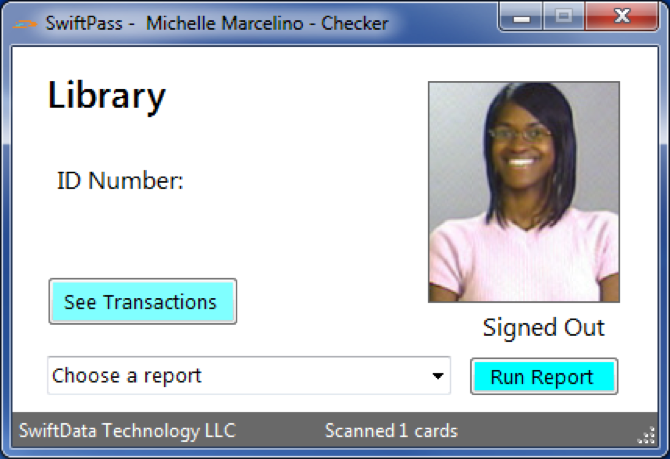
The SwiftPass Module includes unlimited licenses of the application that can operate on any Windows PC, desktop or tablet. SwiftPass can be used in locations like:
- Tutoring
- Advising
- Career Services
- Library
- Computer Lab
- Gymnasium
- Athletics
- Science Lab
- Music Studio
- Residence Halls
- Etc.
The more locations where attendance and activity is recorded the broader the overall picture of a student’s engagement with the institution.
SwiftData will custom-configure SwiftPass at each campus location for the client. Access privileges can be based on any demographic data available within the Pinwheel DME.
For example, you can restrict access to a Rec Center to only full-time students and active staff/faculty. Since Pinwheel DME runs continuously the data feeding SwiftPass is updated dynamically. If a student drops a class and is no longer a full-time student their access to the Rec Center would be revoked within minutes. The business logic can be customized in any way based on the available data.
SwiftPass currently only runs on Windows machines and requires a client-supplied USB reader (swipe/prox/contactless). The annual SwiftPass Module licensing fee includes all technical support and configuration of the application.
Pinwheel DME Dashboard
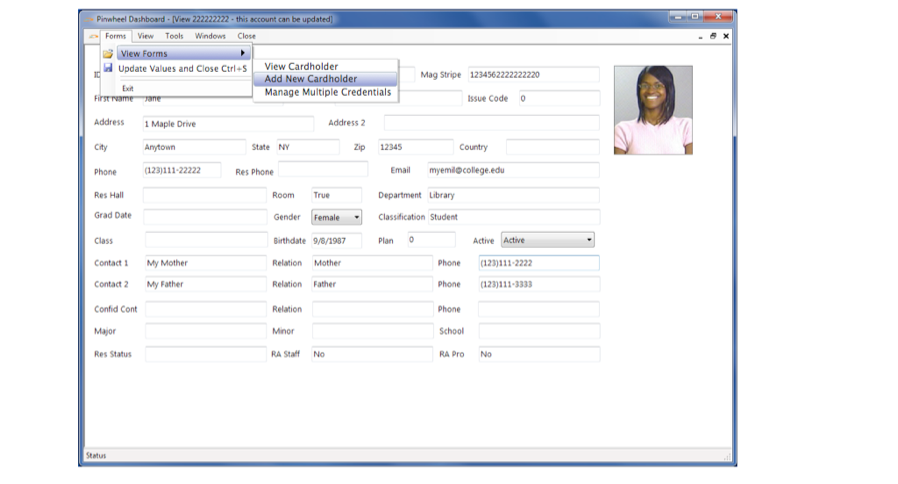
Pinwheel DME also includes an administrative dashboard program. Your administrators can use the DME Dashboard to view a record from the encrypted DME database and as an easy way to assign door access and meal plan privileges to different systems in one spot. This is great for cardholders that don’t exist in your ERP system like for guest, contractors, camps and conference cards.
SwiftData Licensing & Support Policy
The Pinwheel DME is licensed on an annual subscription basis. A license is required to operate the Pinwheel DME. The annual licensing fee includes not only technical support and maintenance, but also ongoing consulting services. Consulting services cover updates or modifications you wish to make to your data management workflows and business rules.
SwiftData offers web-based service and support to all licensed clients and end-users. Service hours are from 8am – 6pm EST, Monday thru Friday (excluding major holidays.)
Contact SwiftData support at help@swiftdata.works.